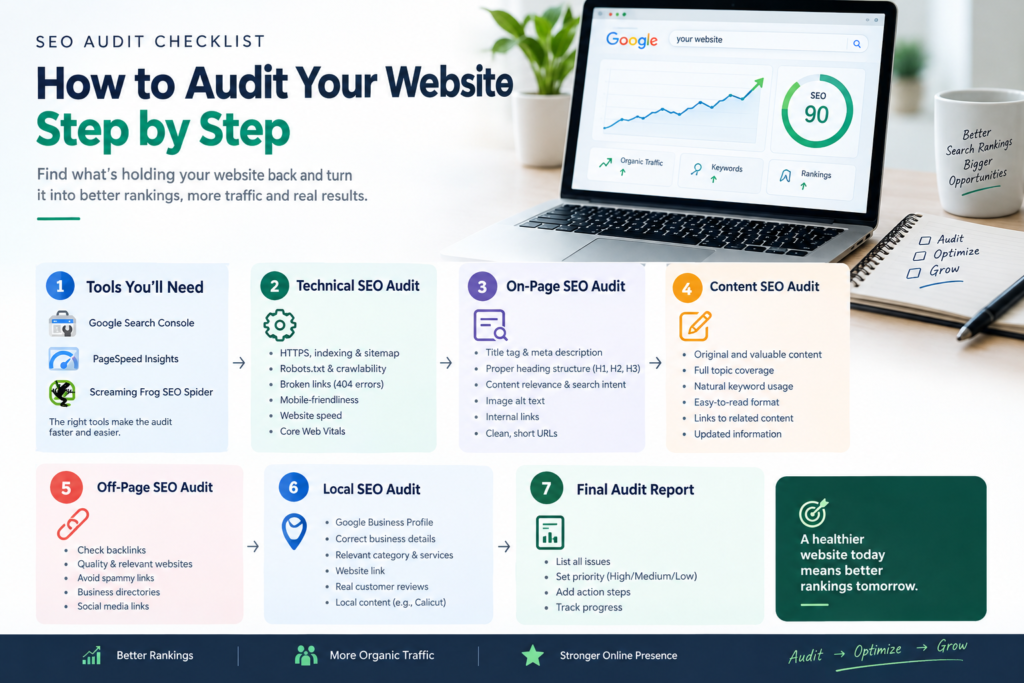
SEO Audit Checklist: How to Audit Your Website Step by Step
Introduction
A website audit helps you find out what is working and what needs improvement on your site. An SEO audit checklist makes this process simple by breaking it into clear steps. Whether you run a small business website, an online store, or a blog, regular audits help improve rankings, traffic, and user experience. Search engines keep changing their rules, so a site that ranked well last year can slowly lose its position if it is never checked. In this guide, you will learn how to audit your website step by step, from technical checks to content, backlinks, and local SEO, so you can fix problems early and grow with confidence.
What Is an SEO Audit?
An SEO audit is a complete review of your website to check how well it is optimized for search engines. It looks at technical issues, on-page SEO, content quality, and backlinks. The goal is to find problems that stop your site from ranking higher on Google. These can include slow page speed, broken links, missing meta tags, duplicate content, or poor mobile usability. Once you know what is wrong, you can prioritize the fixes and track your progress over time. A good audit does not just list errors. It gives you a clear action plan to bring more organic traffic and better results.
Why You Need an SEO Audit
Find and fix technical errors
Improve page speed and mobile experience
Identify thin or duplicate content
Check keyword optimization
Improve internal linking
Track backlink quality
Step 1: Check Website Indexing
First, check if Google can find and index your pages.
Go to Google Search Console
Use the “URL Inspection” tool
Enter your homepage and important pages
If pages are not indexed, check for
noindextags, robots.txt blocks, or crawl errors.Check if they are indexed
Step 2: Check for Technical Errors
Use tools like Screaming Frog, Ahrefs, or Semrush to crawl your site. Look for:
Broken links (404 errors)
Redirect chains
Duplicate content
Missing meta titles or descriptions
Missing alt text on images
Fix these issues one by one to improve site health.
Step 3: Check Page Speed
Page speed affects both rankings and user experience. Use Google PageSpeed Insights to test your pages.
Aim for a load time under 3 seconds
Compress large images
Enable browser caching
Minify CSS and JavaScript
Use a fast hosting provider
Step 4: Check Mobile-Friendliness
Most users browse on mobile, so your site must work well on phones.
Use Google’s Mobile-Friendly Test
Check if buttons and text are easy to tap/read
Make sure the layout adjusts properly on small screens
Step 5: Review On-Page SEO
Check each important page for:
Title tag with main keyword
Meta description with keyword
H1 tag (only one per page)
H2/H3 headings with related keywords
Keyword in URL slug
Internal links to related pages
External links to trusted sources
Step 6: Check Content Quality
Google rewards helpful, original content. Review your pages and ask:
Does this content answer the user’s question?
Is it better than competing pages?
Is it up to date?
Is it easy to read?
Update old posts, remove thin pages, and improve weak content.
Step 7: Check Backlinks
Backlinks are links from other websites to yours. They help build authority.
Use Ahrefs or Semrush to check your backlink profile
Look for spammy or broken links
Try to earn links from relevant, high-quality sites
Step 8: Check Analytics and Track Progress
Use Google Analytics and Search Console to track:
Organic traffic
Keyword rankings
Click-through rate (CTR)
Bounce rate
Conversions
Set a schedule to audit your site every 3–6 months.
Conclusion
An SEO audit checklist helps you keep your website in top shape. By following these steps, checking indexing, technical errors, speed, mobile experience, on-page SEO, content, and backlinks, you can improve your rankings and traffic over time. Regular audits help you catch small problems before they turn into big ones, and they show you exactly where to focus your time and effort. Start with the technical basics, fix the high-priority issues first, and then move on to content and link building. Make audits a regular part of your digital marketing routine, and your website will stay healthy, visible, and ready to grow.